
Instead of manually matching chauffeur confirmations to expense claims after each journey, build a corporate expense chauffeur booking workflow that connects the travel request, approval, booking and final receipt in one record. Keep itinerary changes attached to that record so finance can reconcile the journey without reconstructing it from separate messages.
- Build your corporate expense chauffeur booking workflow around one shared booking reference, not separate email threads.
- Fifth Ave Auto Group suits corporate travelers seeking self-drive rentals and chauffeur options from one team.
- Approve the service format and itinerary before confirming the booking; reconcile against the final supporting documents.
- Keep business travel and personal wedding journeys separate, even when the same person arranges both.
Why this matters
An hourly chauffeur request describes an intended journey. An expense claim describes what the company is being asked to reimburse or record. Connect those records before booking, not after the receipt arrives.
For your 2026 travel process, give each journey a business purpose, an accountable traveler and a named approver. Then carry the same reference through the inquiry, confirmation, changes and expense submission. The reference connects documents; it does not replace them.
Fifth Ave Auto Group offers luxury self-drive rentals and chauffeur services for individuals and corporate clients in New York, New Jersey and Long Island. Review the service options before deciding which format belongs in the request. Both formats fit this workflow, but they require different operational details.
This guide describes a process you can configure in your existing request form, shared register and expense system. It does not assume a direct connection between the vehicle provider and your finance software.
Before you start
- Gather the right access. You need permission to maintain a travel register, submit expense documentation and route requests to the person authorized to approve them. Confirm who can commit the company to a booking.
- Prepare the journey details. Collect the requested vehicle or category, dates, service format, passenger and luggage requirements, itinerary, billing entity and business purpose. For self-drive, identify the intended driver and ask which eligibility documents are required.
- Check the document handoff. Do not assume the booking contact, passenger and payer are the same person. Ask who receives the confirmation and final billing documents, and whether your internal booking reference can appear on them. If it cannot, record the provider reference alongside it.
Non-obvious gotcha: a booking confirmation is not proof of payment. Establish what finance requires before the trip, particularly when a company pays directly rather than reimbursing an employee.
The bold field names below are suggested labels for your own register. They are not claims about a provider portal or a particular expense application's interface.
Booking record configuration
Create 1 booking record per journey as your internal control. A journey can include several stops, but unrelated trips should not share a record simply because the same executive takes them.
Define the request fields
- Create a unique Booking reference. Use your organization's existing reference convention rather than introducing a competing numbering system.
- Add Traveler, Requester, Approver, Business purpose, Billing entity and Cost center. Separate the traveler from the requester when an assistant or travel coordinator makes arrangements.
- Add Service format, with your internal choices Hourly chauffeur, Point-to-point transfer and Self-drive. Record the requested vehicle separately so a model name does not substitute for a service decision.
- Add Travel dates, Pickup time, Pickup location, Stops, Final destination and Requested end time. Include the local time zone whenever the itinerary or requester crosses time zones.
- Add Passenger count, Luggage, Vehicle request and Provider reference. Keep the provider reference blank until it is supplied; do not create one yourself.
For a 2026 travel register, retain the full calendar date rather than a weekday alone. An itinerary forwarded without its original email context should still identify the intended journey.
Expected result: someone outside the original conversation can understand who is traveling, why, when and under which service format.
Choose the service format
Use the journey's requirements to select a format. The table compares planning choices, not guaranteed booking terms.
| Service format | Best for | Planning benefit | Limitation to resolve |
|---|---|---|---|
| Hourly chauffeur | A meeting itinerary with several planned stops | Keeps the itinerary organized around a requested service period | Confirm the booked period and how changes are handled |
| Point-to-point transfer | A defined pickup and destination | Gives the request a clear journey boundary | Additional stops or waiting require clarification |
| Self-drive | A traveler who wants to drive the rented vehicle | Places driving and route decisions with the renter | Confirm driver eligibility, insurance requirements and rental conditions |
A chauffeured black luxury SUV can be a vehicle request for a corporate journey. Specify that preference, passenger count and luggage requirements, then ask for confirmation of the proposed vehicle and color. Do not treat a category request as confirmation of a particular specification.
For self-drive luxury rentals, name the intended driver and describe the proposed route. Do not submit a self-drive rental as a chauffeur expense merely because both come from the same provider. The supporting requirements differ.
Approval and inquiry configuration
Use 2 approval checkpoints in this suggested process: authorization before confirmation, followed by expense review after travel. Apply any additional controls your organization requires.
Route the request before confirmation
- Set Approval status to Awaiting review in your internal register. Send the approver the service format, business purpose, itinerary and billing entity together.
- Request a written proposal using the approved journey details. Fifth Ave Auto Group pricing is available on request; obtain the applicable terms before seeking booking authorization.
- Attach the proposal to the record. Ask the provider to clarify the requested service period, itinerary, vehicle, payment arrangements and terms governing changes or cancellation.
- Record Approved scope, Approved by and Approval date. Save the approval message or document rather than relying on a status label alone.
- Confirm the booking only after the authorized person approves the proposal. Record the provider's confirmation and reference against the internal booking reference.
The internal reference should travel with the inquiry even if the provider cannot place it on every document. That gives your coordinator a consistent way to match incoming correspondence.
Expected result: the confirmed journey has a documented business purpose, approved scope and identifiable booking confirmation.
Send a qualified inquiry
Use a compact request rather than a general question about a car. Include:
- Vehicle request: preferred model or category, including a black luxury SUV preference when relevant.
- Dates: full travel dates and local pickup times.
- Service format: hourly chauffeur, transfer or self-drive.
- Itinerary: pickup, planned stops, destination and requested end time.
- Travel requirements: passengers, luggage and any requirements that need explicit confirmation.
- Administration: booking contact, billing entity, internal reference and requested supporting documents.
Submit those details through the contact page. A complete inquiry gives the team a defined journey to assess; it does not constitute a confirmed reservation.
For a 2026 corporate event, distinguish guest transportation from an employee's personal extension. Ask for separate documentation where your company policy requires separate treatment.
Expense handoff configuration
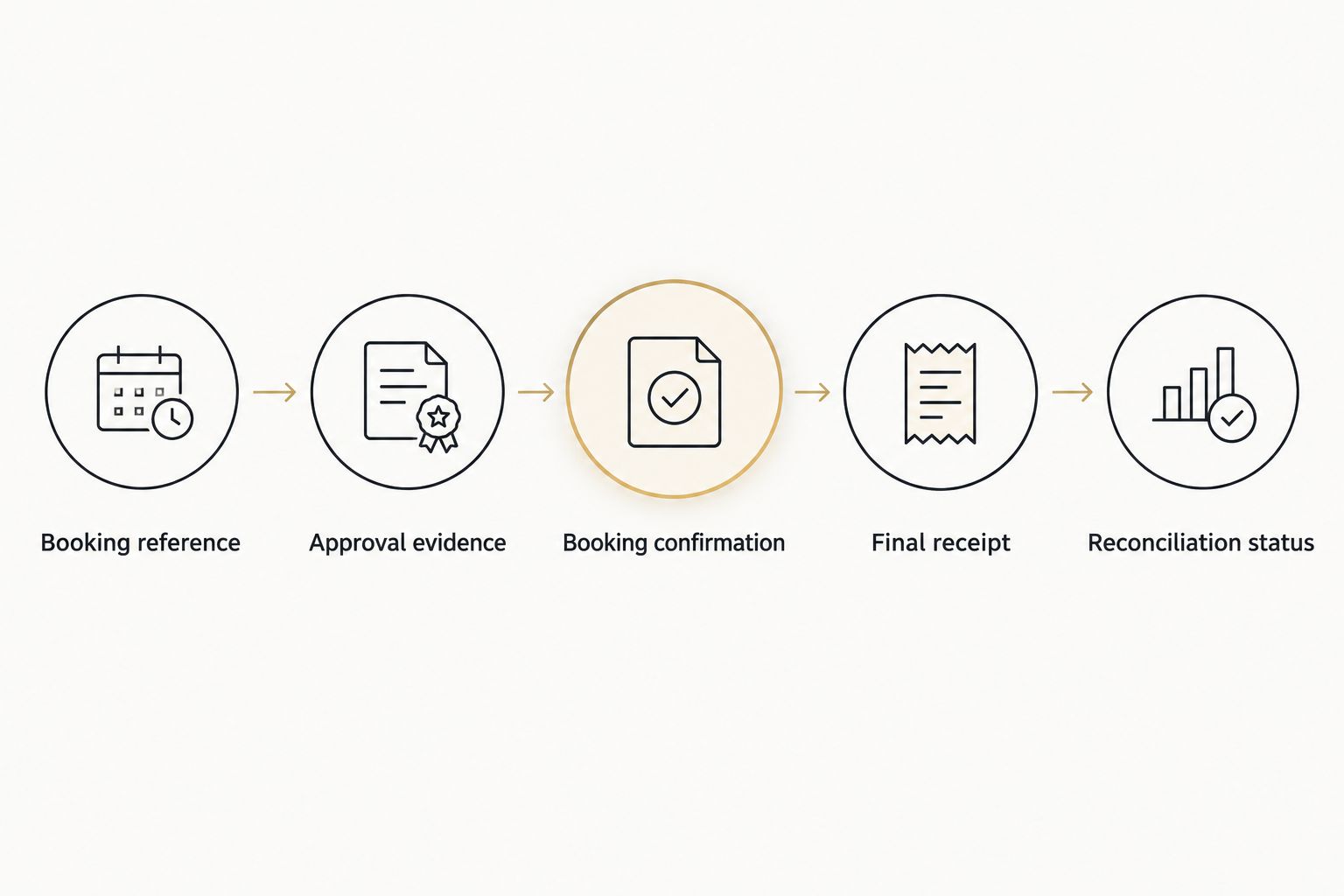
Organize 3 document types in the booking record: approval evidence, booking evidence and final expense evidence. Keep itinerary revisions with the booking evidence so the final claim has context.
Connect the documents
- Create internal fields for Approval evidence, Booking confirmation and Final receipt or invoice. Store documents in your approved company location, with access limited according to company policy.
- Add Payment method, Payer and Expense treatment. Identify whether the journey is company-paid, employee-paid or awaiting finance classification.
- Record the final supporting document against the same booking reference. Check the supplier identity, journey date and billed service against the confirmed record.
- Enter the company's required accounting details in the expense system. Use the existing expense category that finance approves; do not invent a tax treatment or assume the journey is deductible.
- Attach the required evidence and send the expense for review. Mark Reconciliation status as complete only after discrepancies are resolved and the required review is finished.
Expected result: finance can trace the submitted expense back to the authorized journey without asking the traveler to rebuild the booking history.
The handoff is a sequence, not necessarily a software integration. Keep the same reference visible at every stage, whether your organization uses forms, email or an expense platform.
Test the handoff before travel
Use a clearly marked draft journey to check the process. Confirm that the requester can attach documents, the approver can see the itinerary and finance can retrieve the final evidence location.
Do not send a test request to the provider as if it were a real booking. Test your internal process separately, then submit the actual inquiry when its details are ready.
For your 2026 workflow, assign an owner to unresolved records. A completed journey with missing evidence should remain visible as unfinished administration, not disappear into an archived calendar invitation.
Update the record whenever the itinerary changes
An adjacent workflow handles changes after confirmation. Keep the original approved record and append the revision rather than replacing the history.
- Record the Requested change, Requested by and Change time. State whether it affects pickup, stops, destination, passengers, vehicle or requested service period.
- Ask the provider to confirm the operational and billing implications. Do not assume an internal calendar edit changes the booking.
- Seek renewed approval when the revision falls outside the authorized scope or your company policy requires it.
- Save the revised confirmation and notify the traveler, coordinator and other necessary participants. Mark the earlier itinerary as superseded.
- Compare the final documentation with the latest confirmed version during reconciliation.
Expected result: the traveler, provider and finance reviewer can identify the same current itinerary while retaining the original approval trail.
This variant is particularly useful for a corporate roadshow with changing meeting locations. For an airport journey, distinguish a flight update from a confirmed change to the pickup arrangement.
Troubleshooting
The receipt does not show your internal reference
Match the receipt using the provider reference, traveler and journey date. Add the connection to your internal record and retain the original document unchanged. Ask about reference handling before the next booking.
The passenger receives documents that finance needs
Update the administrative contact arrangement with the provider. Have the passenger forward existing documents through your approved company channel; avoid circulating payment details or identity documents beyond the people who need them.
The final document differs from the approved proposal
Compare it with the confirmed itinerary and saved revisions. Ask for an explanation of any unresolved difference, then route any approval exception through company policy. Do not rewrite the original approval to make the records agree.
An employee submits an expense already paid by the company
Check Payer and Payment method before approving reimbursement. Follow your expense system's procedure for company-paid items and duplicate submissions. A receipt attached to a claim does not establish that the employee paid it.
A calendar change never reached the provider
Contact the provider to confirm the actual arrangement. Save the response, update the current itinerary and notify the traveler. Treat the shared calendar as a planning aid, not evidence that the booking changed.
Customize your workflow
Keep the record structure consistent; change the journey-specific questions. Fifth Ave Auto Group offers self-drive rentals and chauffeur options from one team, but your approval form should still distinguish them.
For self-drive, add the intended driver, pickup and return arrangements, and confirmation of required rental documentation. For chauffeured journeys, emphasize passenger handoff details, stops and the requested service period. Ask which requirements apply rather than assuming a common policy.
Wedding car bookings need their own purpose and itinerary. Record venue addresses, passenger movements and the service format, but keep personal wedding travel separate from corporate expenses unless your organization explicitly authorizes its treatment.
Review the template against your 2026 travel policy. Remove fields nobody uses, retain evidence needed for review and assign responsibility for closing each record.
FAQ
How do I connect an hourly chauffeur booking to corporate expenses?
Use one internal booking reference across the request, approval, confirmation and final expense documents. Record itinerary changes under the same reference and reconcile the final evidence before closing the record.
Does this workflow require a direct software integration?
No. You can maintain the connection through a shared register and your existing expense system. Only configure automated transfers after confirming the systems support them and your organization permits them.
What should I include when requesting an hourly chauffeur booking?
Include the requested vehicle, dates, local times, service format, itinerary, passenger count and luggage requirements. Add the billing entity, booking contact and internal reference so the administrative handoff is clear.
Can the same workflow cover self-drive luxury rentals?
Yes, but self-drive rentals need their own request fields and supporting requirements. Identify the intended driver and confirm eligibility, insurance requirements, pickup and return arrangements before booking.
Can I request a chauffeured black luxury SUV for corporate travel?
Yes, you can specify a chauffeured black luxury SUV in your inquiry. Ask the provider to confirm the proposed vehicle, color and suitability for the stated passengers and luggage before treating those details as agreed.
Can I include wedding car bookings in the corporate expense process?
Use the booking template for wedding travel, but do not automatically classify a personal wedding journey as a corporate expense. Keep its purpose and documentation separate unless company policy and an authorized approver permit otherwise.
What should finance check before closing a chauffeur expense?
Finance should match the final supporting documents to the approved journey and its confirmed revisions. Check the payer, business purpose, accounting classification and unresolved differences according to company policy.
One last thing
A calendar invitation is not a booking confirmation, and a booking confirmation is not a receipt. Keep each document for its own purpose. That distinction is the simplest control to preserve when a journey changes hands between an assistant, traveler and finance reviewer.